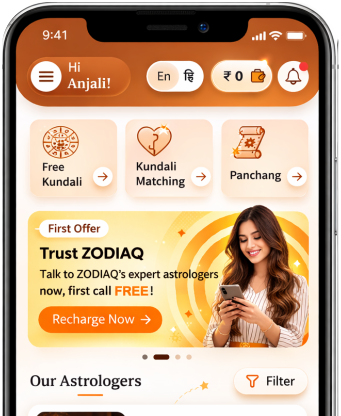
How to use the Kundli Milan feature in Astrologer homepage
By Pt. Amitabh Sharma
A step-by-step guide on how to use the Kundli Milan feature that is provided to the Astrologer.

Table of Contents
1. Navigating to Kundli Milan
On the screen, locate the Kungli Milan icon, and press it to be redirected to the feature menu.
Also note: The details of the last three people entered and matched is displayed on the home page, however you can access the full history using the ‘show more’ option.
2. Analyze Multiple Kundali Matches Together
After landing on this page, you will primarily see two separate rows, one for the main person, other for the match.
The secondary match row can be incremented to five, to allow matching of the main person with up to 5 people simultaneously.
Fields to be filled:
- Name
- Gender
- Date of Birth
- Time of Birth, and
- Place of Birth
You can also import data from previous sessions, to use for current session.
NOTE: For gender selection: if you choose male for the primary person, all secondary persons must be female, and vice versa. This enables one-to-many matching (one male with multiple females or one female with multiple males).
These is also a FAQ section for Kundli Matching, which addresses most common questions that may arise during the usage of the service.
Once all details are filled, select the ‘Generate Match’ button to produce the match result.
3. Reviewing the result
The result that are now obtained will include the following details:
- Milan Points Review
- Manglik Dosh Analysis
- Shadashtak Dosh Analysis
- Nadi Dosh Analysis
These can also be generated in a charted format using the ‘chart’ option, which will also include:
- Lagna Chart
- Navamsa Chart
- Moon Chart
These results may also be downloaded as a PDF from the ‘Charts’ tab.
An Ashtakoot table is also generated to compare the compatibility of all the candidates.
Get accurate Kundali Matching result
Kundali MatchingDid you like it?
Author

Pt. Amitabh Sharma (56 Years)
Experience: 20
Consults About: Family Planning, Career
Clients In: Punjab, Haryana, Delhi
Share this article with friends and family
About ZODIAQ
ZODIAQ is an online Vedic Astrology platform. It connects clients seeking astrological advice to experienced astrologers with deep knowledge. Our users also generate kundali and perform kundali milan for free. ZODIAQ also offers services to the Astrologers. Astrologers utilize various offerings by ZODIAQ to serve their clients effectively.
If you are a User
Consult with experienced astrologers and seek their guidance. You can also order handwritten Janm Patrika report with life prediction prepared by experienced astrologers. Generate accurate Kundali, perform Kundali Matching and check horoscope and muhurat. Utilize our online library for all the necessary astrological and spiritual information.
If you are an Astrologer
Create accurate kundali for your clients and perform Kundali Matching for up to 5 people at a time. Write comprehensive Janm Patrika report for your clients with ZODIAQ. Check client details anytime by saving it in client directory. Become more productive by tracking how many clients you guide every day.
WELCOME TO
ZODIAQ
Right Decisions at the right time with ZODIAQ